Developers' Diaries | June, 2026
Released Features
A brand new home in Manager
The platform now opens on a modern home page that puts what you've built right in front of you.
- One-click launchers for Manager, Studio, Automations, Analytics and the Brand Analyzer
- Performance at a glance: impressions, clicks and CTR for the last 7 days
- Recently exported creative sets, so your latest work is the first thing you see
- "What's new" discovery cards for Motion AI, Global Guardrails, Attention Heatmap and Auto-generate Ads
The new home page does the orienting for you - recent campaigns, live performance, and your latest exports are all right there the moment you log in. One click takes you into Manager, Studio, Automations, Analytics or the Brand Analyzer.
It turns the platform into a workspace that already knows what you care about. For designers, that means faster access to the creative you just shipped. For marketing managers, it's a live pulse on performance without opening a single report.
This is also where the brand story starts to come to life. Seeing your recently exported sets front and center is simple today, but it sets up something bigger: once the Brand Analyzer powers this space, the home page will surface brand drift the moment it appears. Long term, this home should adapt to whoever's looking at it — designer, marketer or admin — and this is the first step in that direction.
The Creative Brand Analyzer - brand compliance, built in
The Creative Brand Analyzer is now available directly in the platform, as the second feature in The Lab.
- Pulls a brand's public ads automatically
- Scores every ad against the brand's visual fingerprint, 0–100
- Flags deviations per ad and generates a shareable report
- Now analyzes text ads, video ads and catalogs too, not just images
Brand consistency is easy to talk about and hard to prove. The Brand Analyzer turns it into a number: it pulls a brand's live ads, measures each one against its visual fingerprint, and shows you exactly where things drift — ad by ad.
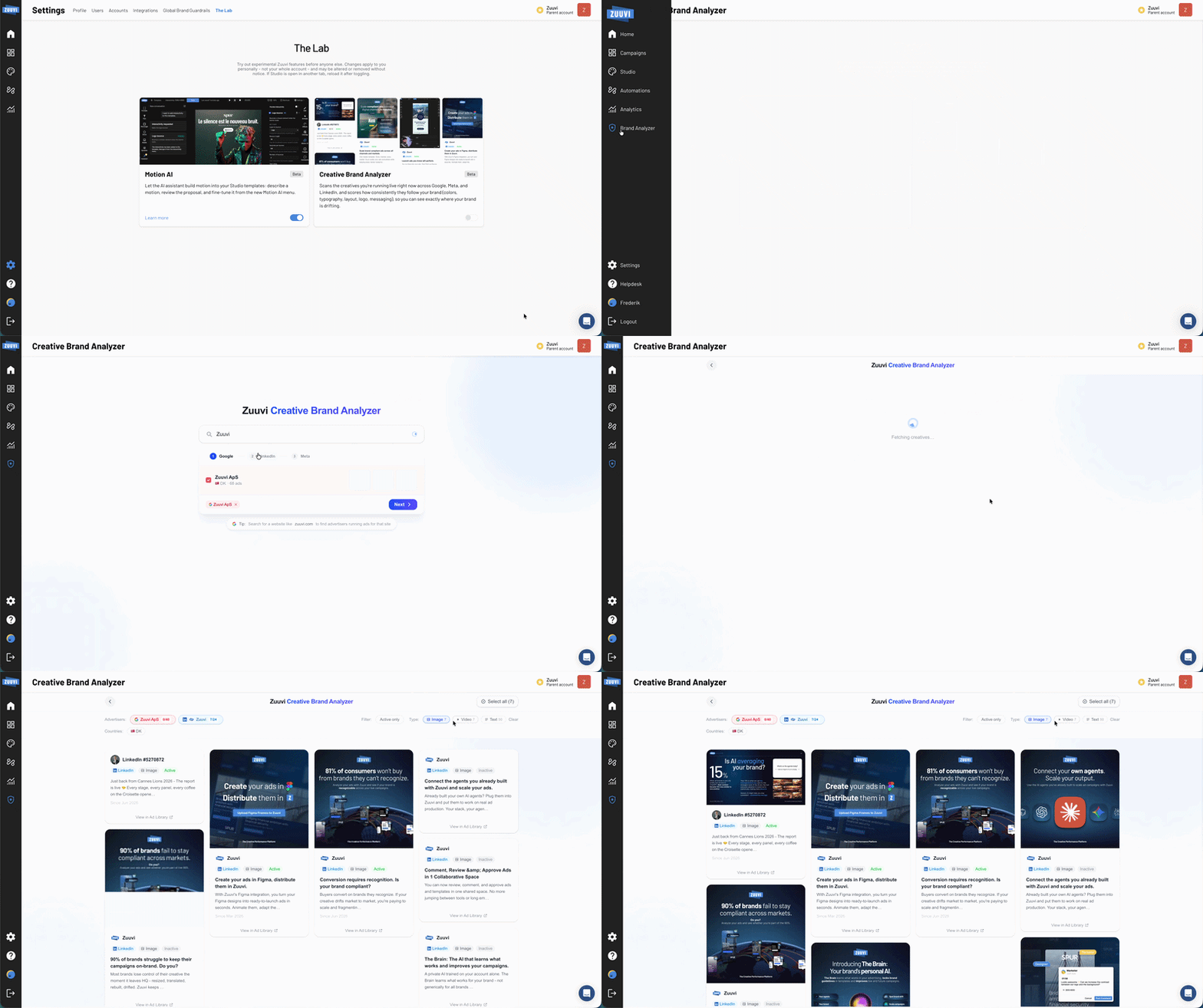
The big upgrade this release is coverage. It's no longer image-only - text ads, video ads and catalogs all get scored now, which means the report reflects the full spread of what a brand is actually running. You get an objective, shareable read on brand alignment across every format, without a single manual review. For anyone pitching or defending brand governance, that report does the arguing for you.
Turn it on: Settings → The Lab → flip the Creative Brand Analyzer card. It's per user, just like Motion AI. We'll keep improving it - next up we're looking into tracking usage and results over time.
Content Engine — feed-scale production for every channel
A whole new automation type that turns a feed into a folder of finished, downloadable assets.
- Uses the same dynamic rulesets as Display Automations and Catalog Ads
- Renders one PNG, JPG or MP4 per row in the feed
- Delivers everything as a single downloadable folder
Our automations have always powered dynamic creative and feeds for display. Content Engine takes that same engine and points it everywhere else. Instead of a dynamic banner, you get an individual rendered asset for every row in your feed — ready to use on any channel.
Think about what that replaces. A 1,000-row product feed used to mean weeks of manual production, one asset at a time. Now it's one automation and a download — feed-scale asset production for every channel outside display. Social, marketplaces, email, print — wherever a static or video asset needs to go, Content Engine produces it at the scale of your catalog.
Content Engine is permission-gated for now. Accounts without access will see an upgrade card with a "Talk to sales" button.
Small bonus: publish support in Studio
Studio now includes a quick pre-publish checklist that catches the classic gotchas before an ad goes out — a missing click-tag, a feed that was added but never mapped to the creative, or an animated DPA feed without a snapshot frame set. It's not there to block you from publishing, just to flag the things that are easy to miss. Down the line, this is also where we'll be able to warn designers about brand drift — before a template ever goes live.