Developers' Diaries | July, 2026
Split test, collaborate, and publish smarter — here's what's new in Zuuvi. Below is an overview of what's just been released and what's in progress.
Released Features
Collaborative Preview — Feedback Without the Email Thread
-
Contextual comments tied to specific formats, timestamps, or both
-
External reviewers can comment without a Zuuvi account
-
Resolve, reject, and manage feedback directly in the platform
Comments visible inside Studio via the right-side menu.
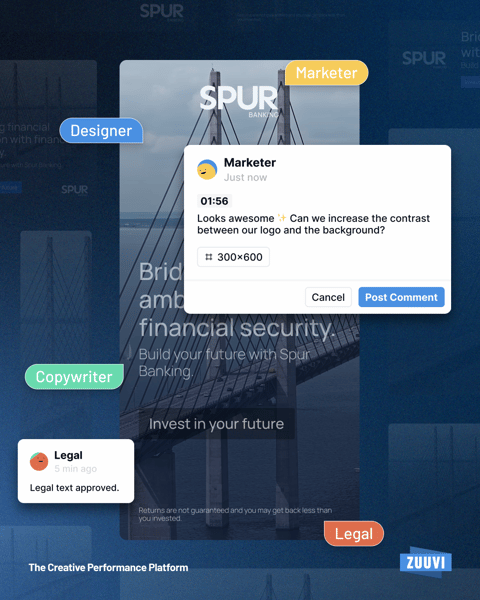
No more long email threads or scattered feedback.
Marketing managers spend less time chasing feedback across email chains and shared drives. Designers spend less time guessing which version of feedback is final.
With comments tied directly to formats and animation moments, everyone is always looking at the same thing — and approvals that used to take days can now happen in hours.
Faster feedback loops mean faster time to market, without sacrificing quality or stakeholder alignment.
VAST Tag Export — Programmatic Video, Direct from Zuuvi
Activate video campaigns across any programmatic platform in seconds.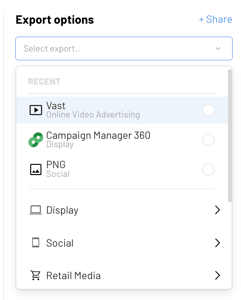
- Export creatives as VAST tags (compatible with versions 2.0–4.2)
- New VAST analytics: viewer retention, mute, pause, skip, and more
VAST is the industry standard for programmatic video delivery. Now it's built straight
into your Zuuvi export flow — and paired with analytics that actually show you how viewers engage with your creatives.
Click your channels and instantly see the matching export options, speeding up your exporting flow significantly.
For teams running online video at scale, this removes a critical bottleneck. Previously, getting a video creative into a programmatic pipeline meant extra steps, extra tools, and extra handoffs. Now it's a single export from Zuuvi — straight into your DSP, with full tracking from day one.
The added analytics mean you can see exactly where viewers drop off, what kills engagement, and which creatives are actually driving completions. Less guesswork, smarter optimisation, better performing video campaigns.
Notion Integration — Turn Your Database into a DCO Source
Connect Zuuvi to the tools your team already uses.
- Use any Notion database as a live DCO source in Studio
- Works across Display Automation, Catalog Ads, and Display
For marketing teams that plan and manage campaigns in Notion, this closes the loop between strategy and production. Change a headline, a price, or a CTA in your Notion database and your live ads reflect it — no briefing a designer, no re-exporting, no delay.
It's the difference between reacting to campaign changes in minutes instead of days. Especially powerful for teams running always-on campaigns, seasonal promotions, or product-led advertising where content changes frequently.
Recurring Rulesets, Powered by AI — Set It Once, Let It Run
Advanced scheduling for rulesets is here — and your AI Agent does the heavy lifting.
- Toggle on Advanced Scheduling to make any ruleset recurring
- Prompt the AI Agent with your desired schedule and it handles the rest
For campaign managers running time-sensitive or always-on advertising, this is a significant time saver. Rulesets that previously had to be manually re-triggered — think dayparting, weekly promotions, or seasonal switches — can now run on a defined schedule without anyone touching them.
Just describe what you need to the AI Agent and it sets up the logic for you. Less operational overhead, fewer human errors, and campaigns that run exactly when they should — even when no one is watching.
Coming Soon
Studio Redesign — A Faster, Smarter Canvas
The biggest Studio update yet is on its way.
- Multi-layer selection and scaling
- Groups within groups, timeline zoom, and a redesigned Layers & Animations list
- Full Google Fonts weight support
Designers working across large format sets — dozens of sizes, multiple markets, tight deadlines — lose enormous amounts of time to repetitive work. This update changes that.
Bulk actions, better organisation, and a more intuitive timeline mean less time on production mechanics and more time on creative decisions. Faster builds, less frustration, and more room to iterate on what actually performs.
Campaign Manager Redesign — Built Around Your Workflow
More control over how you view and manage campaigns.
- Toggle between vertical and horizontal stage views
- Create, rename, reorder, and delete stages freely
Every team manages campaigns differently. Some work in linear approval flows, others in parallel workstreams across markets or channels.
The Campaign Manager redesign gives teams the flexibility to build a structure that mirrors their actual process — making it easier to track progress, spot bottlenecks, and keep campaigns moving from brief to live without unnecessary friction.